The Most Expensive Cheap Model I Ever Used
I once spent three months writing code to make my AI sound intelligent. The irony, I know, is not lost on me.
I was building rivva, an AI-powered productivity app with an assistant called Nia. We picked the budget model. We were a startup, so frugal was the religion. And for three months, I wrote what I now call the harness. Thousands of lines of orchestration code that included intent classification and functions that controlled the AI’s trajectory. All that designed to make a model that couldn't think look like it could.
Here's the part I'm not proud of: part of me liked writing all that harness code. It meant I was still necessary. If I was the brain behind the operation, the AI couldn't replace me.
Before I show you what changed, let me show you what most founders don't fully understand about how their agent actually works.
How context really costs you
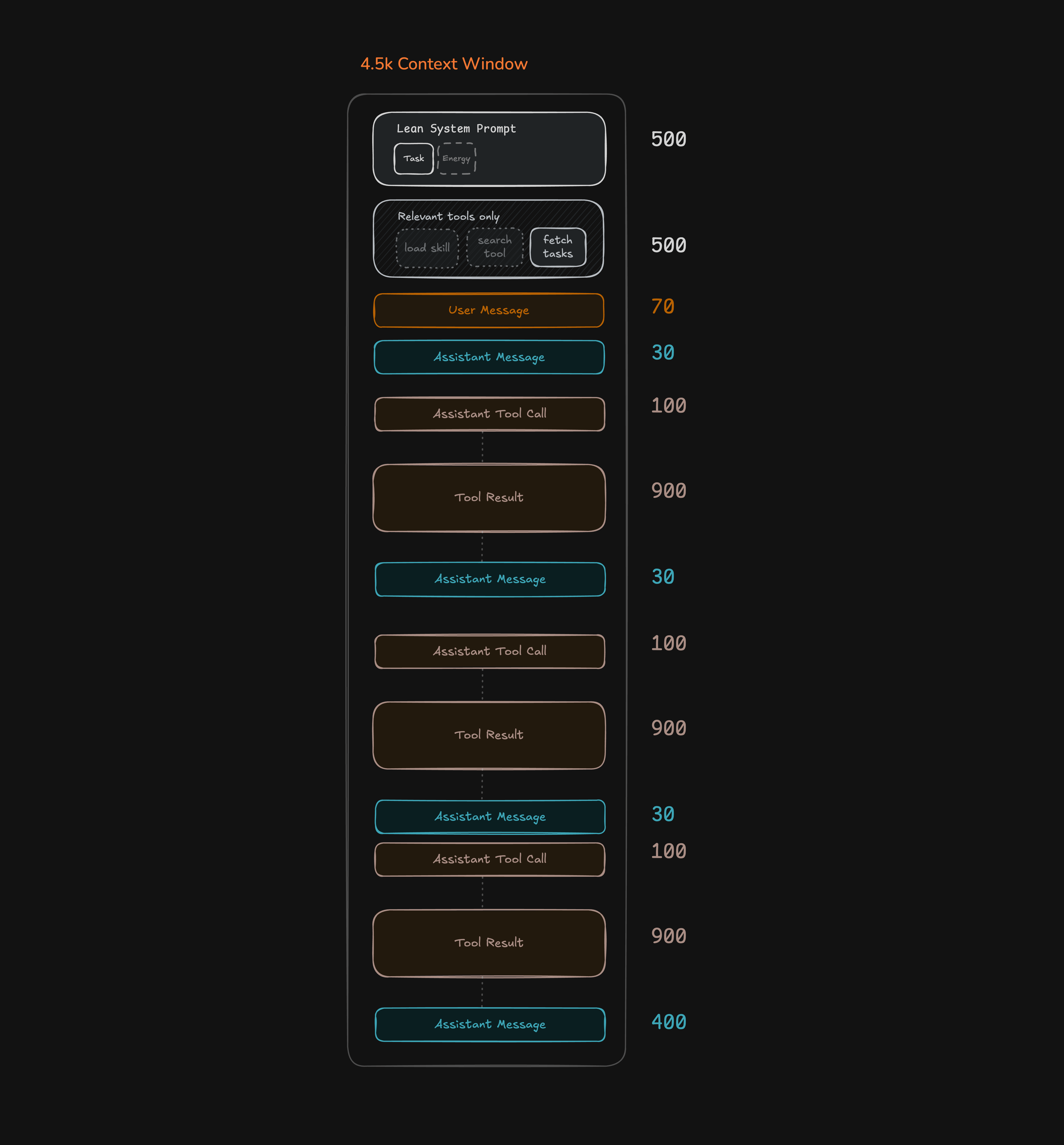
Every time your agent handles a message, this is what gets sent to the model in a single call:
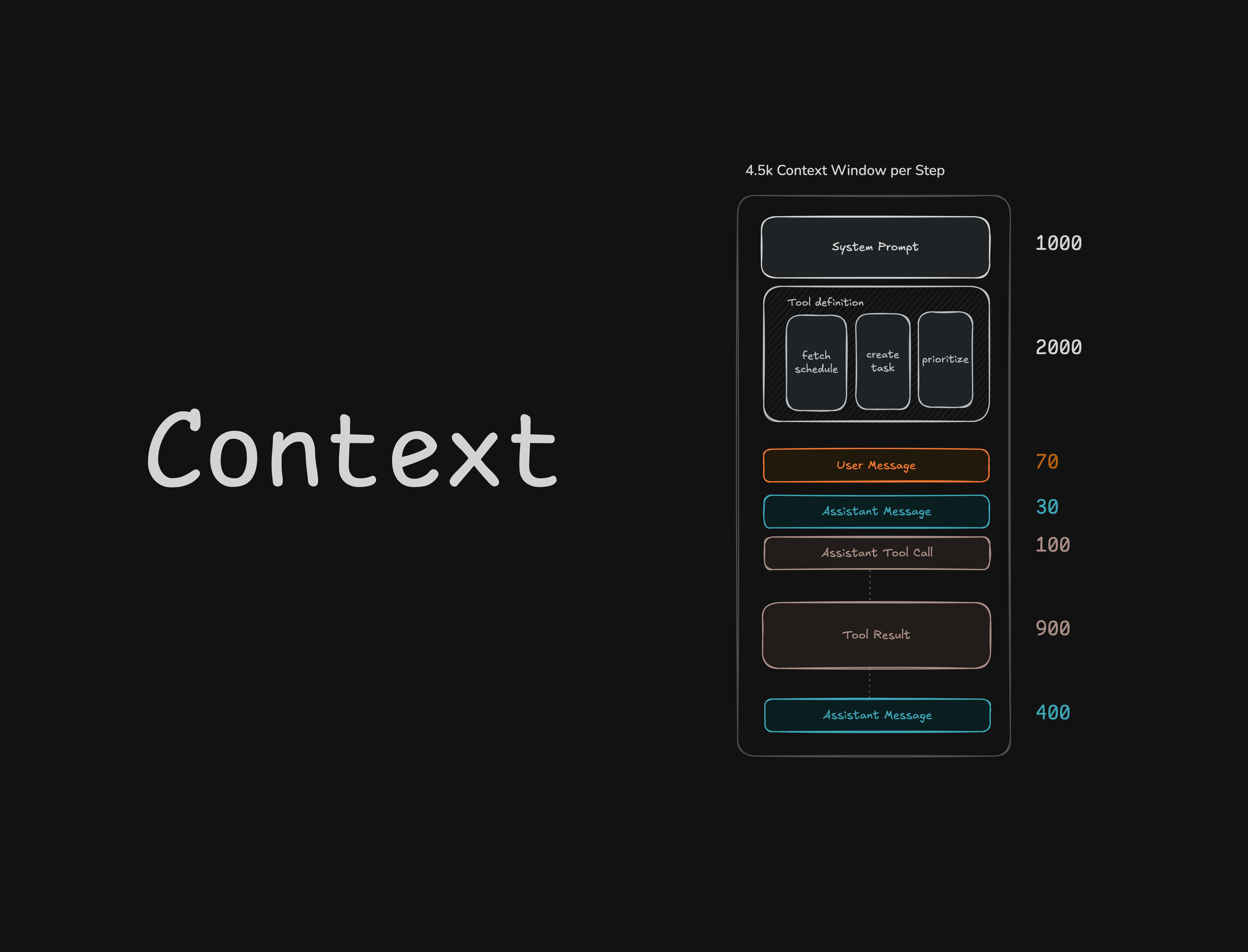
Most founders know about those system prompts, messages, tool calls, and tool results. But what they miss is that tool definitions ride along on every single call. Every tool your agent has access to, its full definition (name, description, input schema) is packed into every request whether the model uses that tool or not. Three tools with typed schemas can cost 2,000 tokens before the model has even started thinking.
Now, an agent isn't a single LLM call. It's a loop:
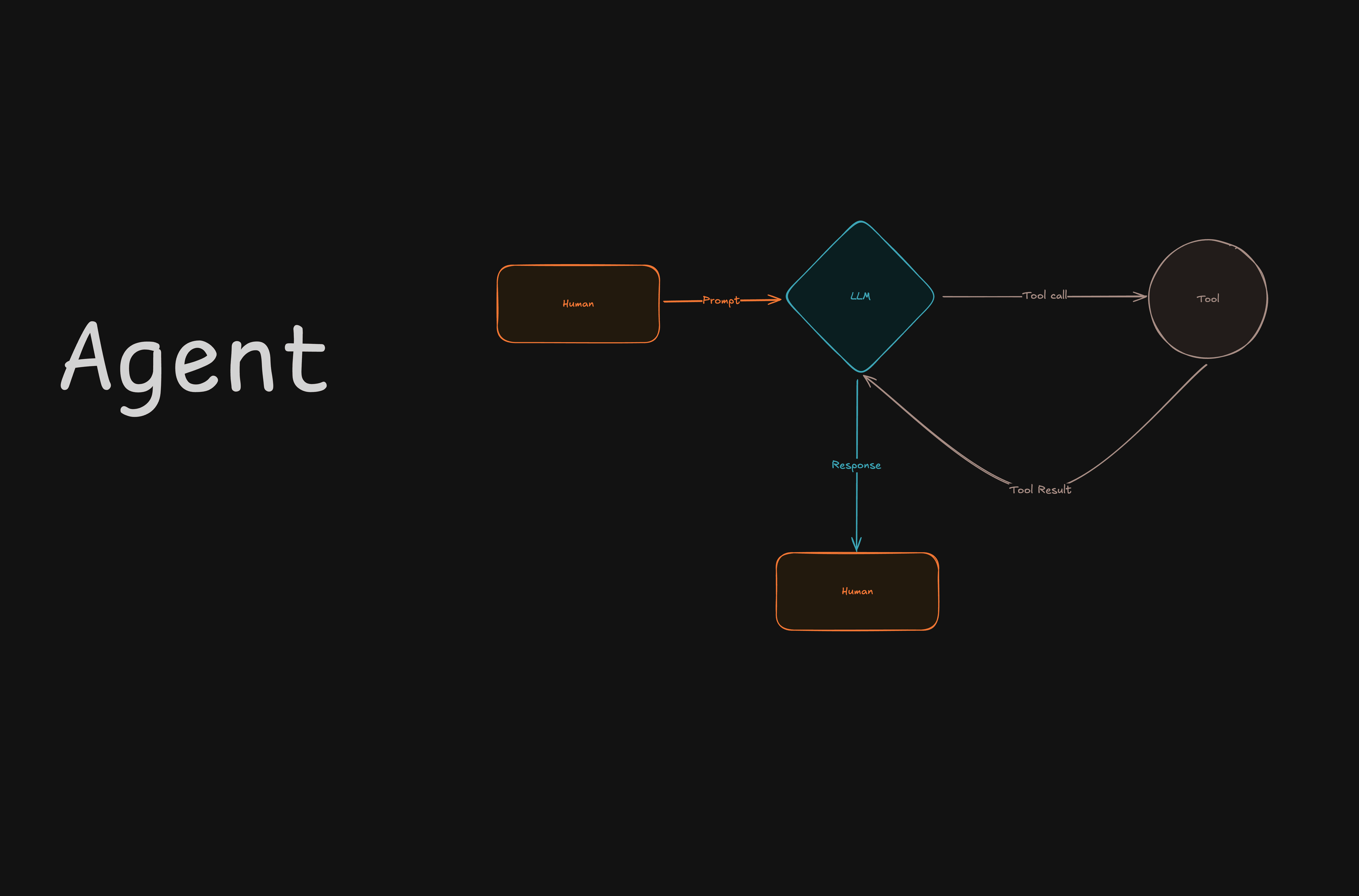
When you ask "what's on my schedule?", the agent receives your message, decides it needs to call a tool, calls it, reads the result, decides if it needs another tool, and eventually responds. Each of those iterations is a step. The part that catches founders off guard is that each step is a separate API call that carries the full context from every previous step.
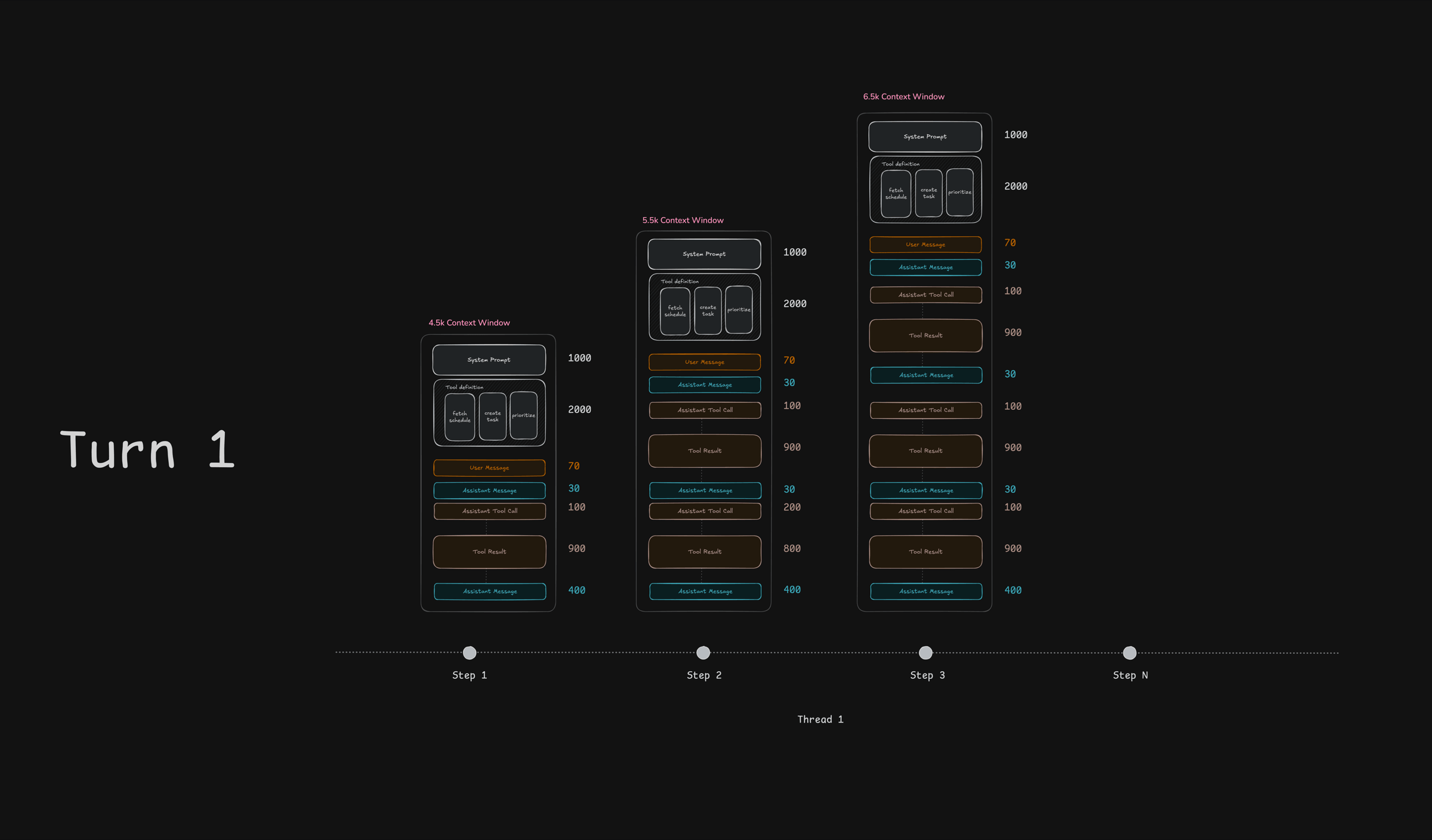
Step 1 sends the base context: 4,500 tokens. Step 2 carries everything from step 1 plus the new tool call and result: 5,500 tokens. Step 3 carries everything: 6,500 tokens. The total cost of this turn isn't 6,500 tokens. It's 4,500 + 5,500 + 6,500 = 16,500 tokens sent to the model across three steps.
Then the user sends a second message. And everything from turn 1, the user message, the assistant response, and by default all the tool calls and results from those steps, carries forward into turn 2.
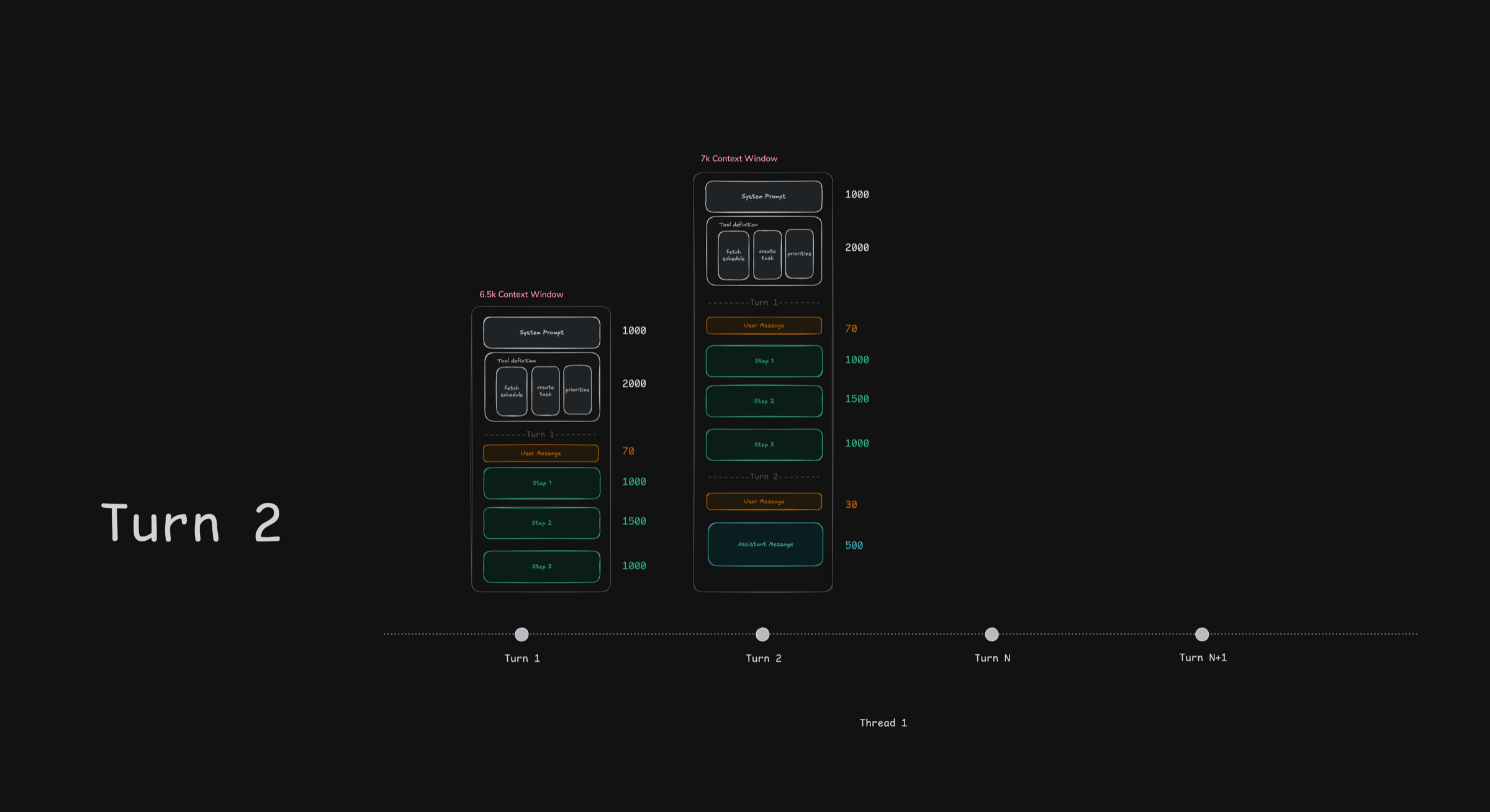
Turn 2's context window is 7,000 tokens, up from 6,500 in turn 1, because it's carrying the full history. By turn 5 of a conversation, you're well past 10,000 tokens per step before the model has done anything useful. This is why your agent more expensive and dumber as conversations get longer.
That's the real cost of context. Not the token price per million, but the rapid compounding.
The moment it broke
We knew context was growing at rivva. During internal testing, we'd see the quality degrade maybe once every two weeks. It felt manageable. Maybe something we'd fix later.
Then we launched to beta users.
The thing we saw once every two weeks, they saw every single day but now it’s multiple users, every day. And when they hit it, they didn't file a bug report and wait. They got discouraged and stopped using the product. One day of user feedback showed us what months of internal testing had hidden.
I was scoping the next sprint when the messages started arriving. Users were texting our product team and co-founders, and those texts were landing in our feedback Slack channel via email. One user wrote that the agent "reads my calendar wrong." When we dug in, we found the agent was mixing up Tuesday's meeting with Thursday's and suggesting deep-focus tasks during low-energy windows. It was mapping the wrong priorities to the wrong time slots. The agent was drowning and did not have the capability to handle what we threw at it. Calendar data sitting next to energy data, tasks piled on top of prioritisation instructions. All of it in a context window that had grown too noisy for the model to reason through.
With the user's permission, they walked us through their setup over WhatsApp, showing us screenshots of their calendar events, their energy readings, and their task list. I took that scenario and pasted it into the smarter model I used for my own non-productivity work. It handled it cleanly making the solution obvious. The hard part was figuring out how to tell my co-founders that the best path forward was to double our costs.
The feedback that hurt the most was that our agent wast not smart. They were saying all the harness I'd spent months writing, wasn't good enough. The harness was supposed to make the model smart but the users were telling me it didn't.
Moving to a smarter model meant going from $2.50 to $5 per million input tokens. But we didn't have many users, and the ones we had were leaving. You can't optimise for cost when you can't keep users. You can't scale a product nobody uses.
So we committed to the expensive model on day one with the intention to figure out scaling later. The priority was to keep the users we had and prove the product worked.
The product improved immediately. Nia's output in two to three paragraphs did what pages of the old model's output couldn't. The team stopped fighting the AI and started building features.
Then the price dropped from $5 to $3. The model got cheaper which proves that within three months, model prices are likely to drop. However your two-person engineering team won't write a harness that makes a weak model smart in that same time.
The real cost of "cheap"
Every line of orchestration code is a vote of no confidence in your model.
Model prices trend down. It's more likely for the price of a model to drop today than for you to write the best possible harness that makes a weaker model smarter.
| Budget model | Smarter model | |
|---|---|---|
| Input cost | $2.50/M tokens | $5 → $3/M tokens |
| Harness code | ~2,000 lines | ~200 lines |
| Quality | Needed you to think for it | Thought for itself |
| Cost trend | Flat (your code doesn't get cheaper) | Dropped 40% on its own |
Even at 100 users doing 20 messages a day, the gap between budget and smart-tier pricing is roughly $960 a month. Less than a contractor for a week. And at zero users? It costs nothing. Start smart. Optimise when you have real usage data.
What we changed
This is what rivva looks like now. Remember that thread diagram with context compounding at every step? By the end of this section, we'll have stripped most of it away.
0. Upgrade to a smarter model
Before any architectural change, the first thing we did was switch to a smarter model.
The math we ran was simple. We were losing users everyday while spending engineering resources on orchestration code trying to make the model smarter, and none of it was working. We are yet to have an opportunity to validate the product because users couldn't get past the quality floor.
The extra cost felt like double the price. While it was, we didn't have many users, and the ones we had were leaving. You can't optimise for cost when you can't keep users and you can't scale a product nobody uses.
Go with that smarter model.
In the worst case, if the price doesn't drop anytime soon, you have a much stronger position: you have users and retention data. You have a validated product which means leverage. You can prove the need for that expense to investors and negotiate enterprise pricing with the provider. Without customers, you have nothing to prove to anyone why they should partner with you.
The three changes below made the cost manageable.
1. Let the model drive. Control the stage, not the actor.
The pattern most founders reach for is an intent classifier. You force the model to categorise the user's message on step 0, then lock it into that category's tools and prompt for the rest of the turn. The AI SDK even has requiredTools to make the model call a specific tool on the first step:
// The anti-pattern: forced classification is a one-way door
prepareStep: ({ stepNumber, steps }) => {
  if (stepNumber === 0) {
    // Force the model to classify on step 0
    return {
      requiredTools: ['classify_intent'],
    };
  }

  // After classification, lock the agent into that category
  const classification = getLatestClassification(steps);
  return {
    activeTools: TOOLS_BY_CATEGORY[classification.category],
    system: PROMPTS_BY_CATEGORY[classification.category],
  };
},
The problem is that classification is a one-way door. Once the model is locked into "tasks", it can't recover if it misclassified the request mid-turn. So you end up writing recovery logic. Which means you need fallback handlers. You also need to disambiguate flows for when the model gets it wrong two turns later. That's exactly the kind of code we already established you shouldn’t be writing.
Fortunately, the fix is simpler. What we do instead is make the model have access to a load_skill tool. It reads the user's message, decides which skill is relevant based on the skills’ descriptions, and calls load_skill itself to pull in more information.
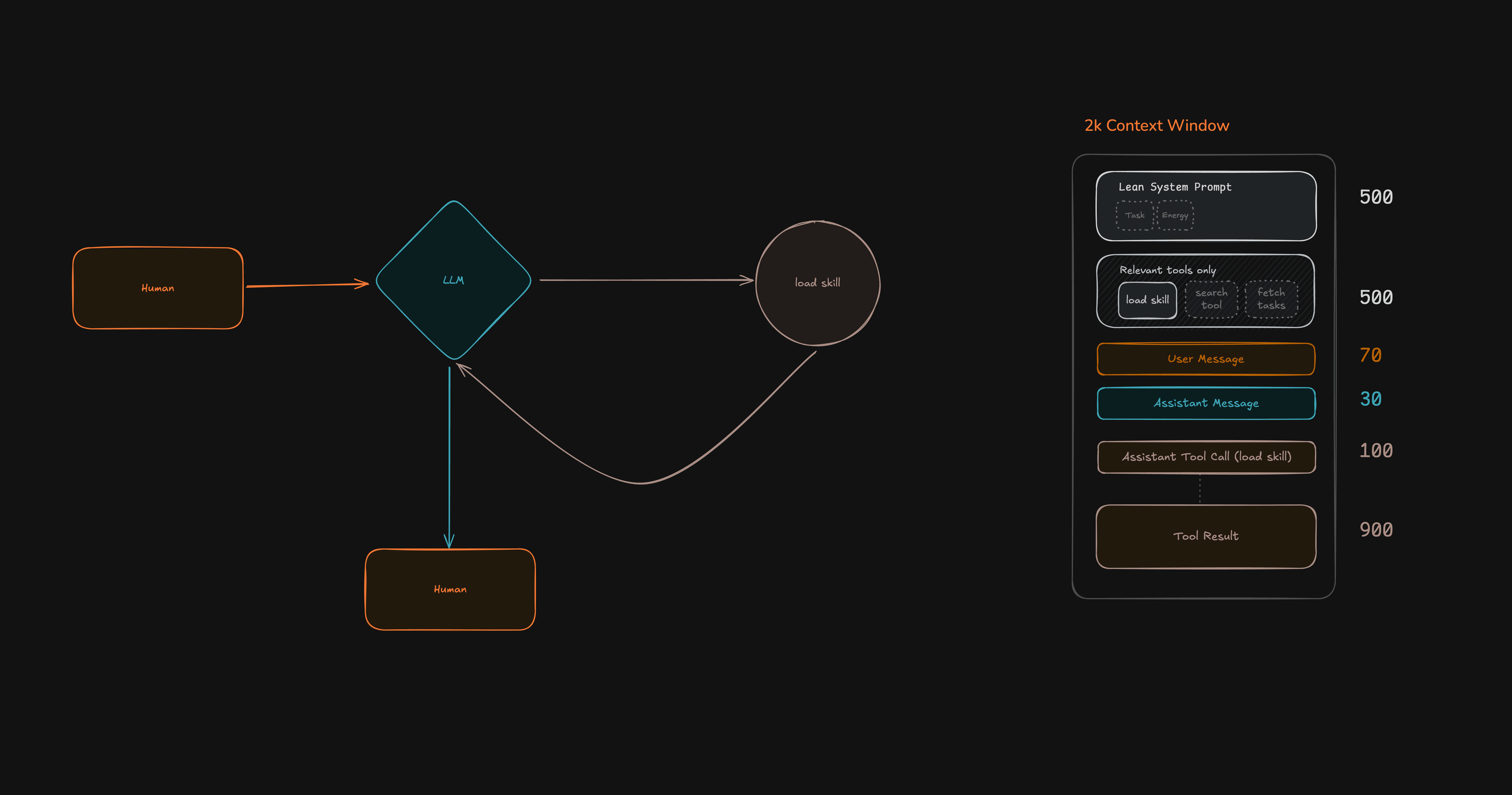
Then search_tools activates only the relevant functional tools:
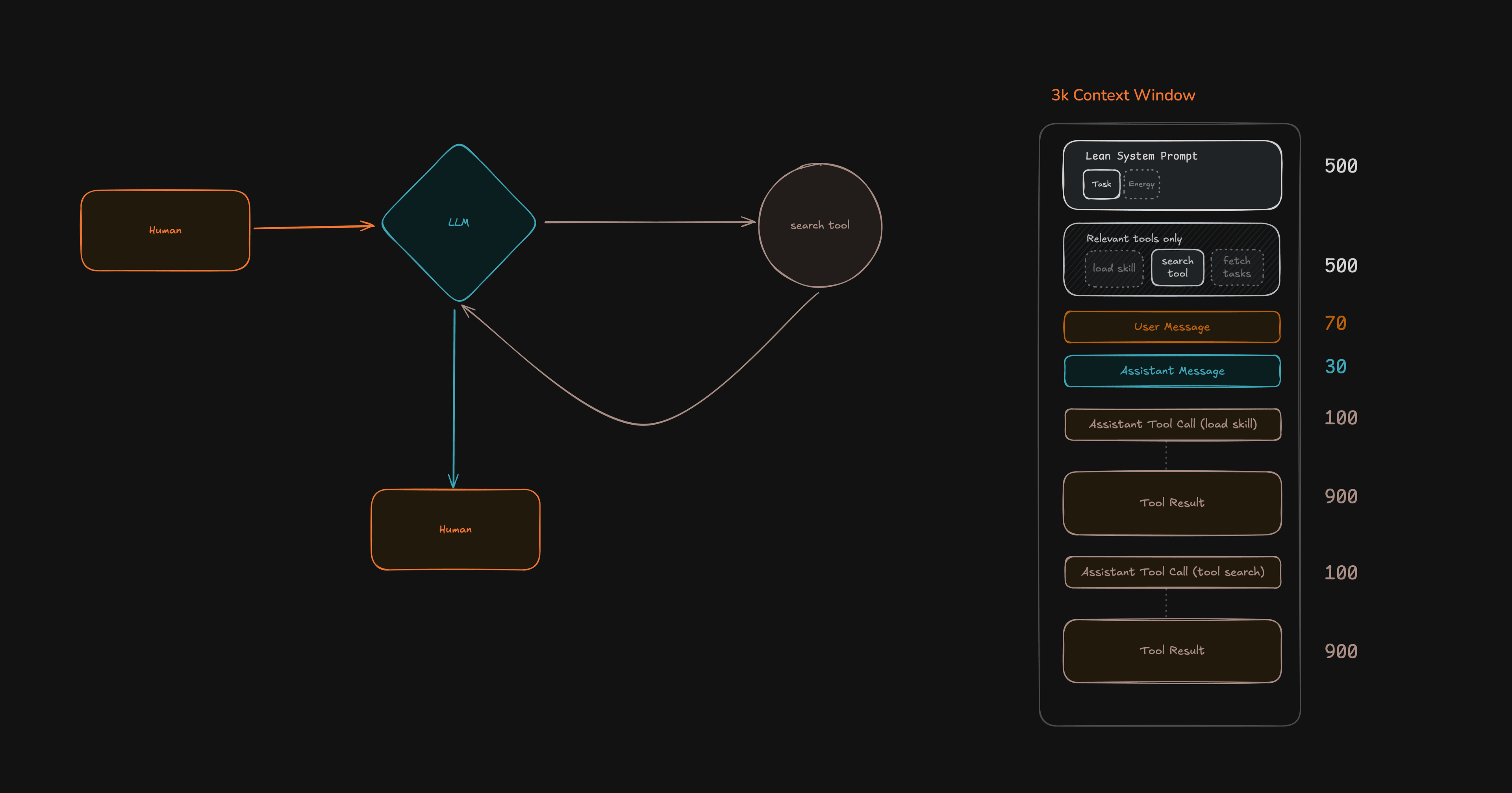
And finally the agent calls the actual tool:
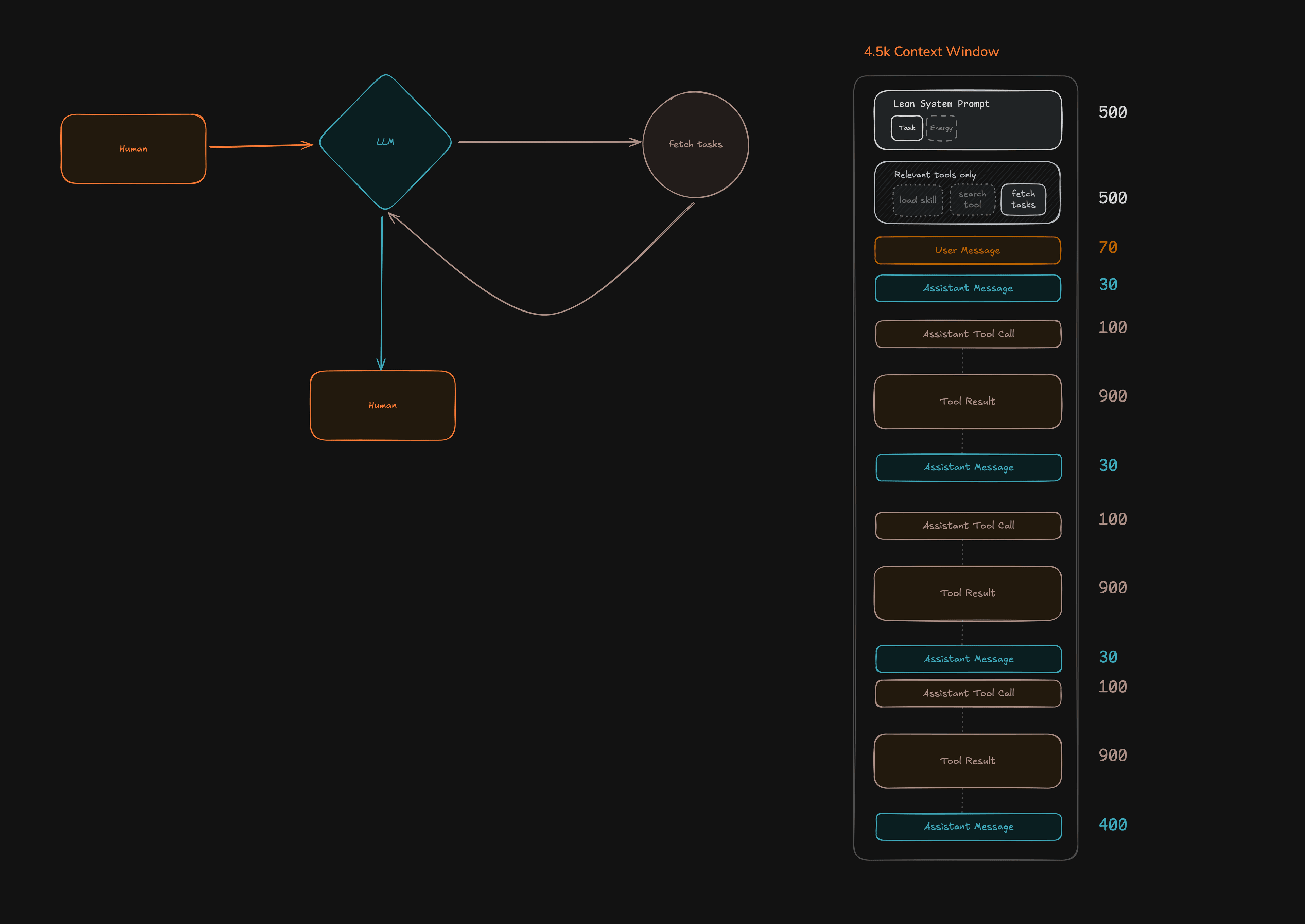
Critically, load_skill stays available on every step. The model can call it again at any point to change direction. It's a suggestion the model makes to itself, not a verdict it's stuck with.
Then prepareStep function controls what the model sees on the next step. It reads the model's choice, injects the matching skill's instructions into the system prompt, and activates only the relevant tools:
prepareStep: ({ steps, messages }) => {
  const stepState = selectStepState(steps);
  const nextMessages = pruneConsumedOrchestrationMessages(messages);
  const nextSystem = buildStepSystemPrompt(
    params.config,
    stepState.activeSkillName,
  );

  return {
    activeTools: stepState.activeTools,
    system: nextSystem,
    messages: nextMessages,
  };
},
Thirteen lines instead of a thousand. And the model can always call load_skill again to change course.
The best orchestration is the kind the model does to itself.
This adds three steps instead of one. Three focused steps of ~1,500 tokens each (~4,500 tokens total). In contrary, one step with all tools loaded could be over 10k tokens. LLM APIs charge by token, not by request. Less than half the cost, and each step has a focused context where irrelevant tool definitions aren't competing for the model's attention.
The intuition that "fewer requests = cheaper" comes from traditional APIs where you pay per call. With token-based billing, the opposite is often true.
2. Keep the context window hygienic.
As stale tool results and old orchestration messages pile up in the context window, the model's performance degrades. It loses track of instructions and starts hallucinating.
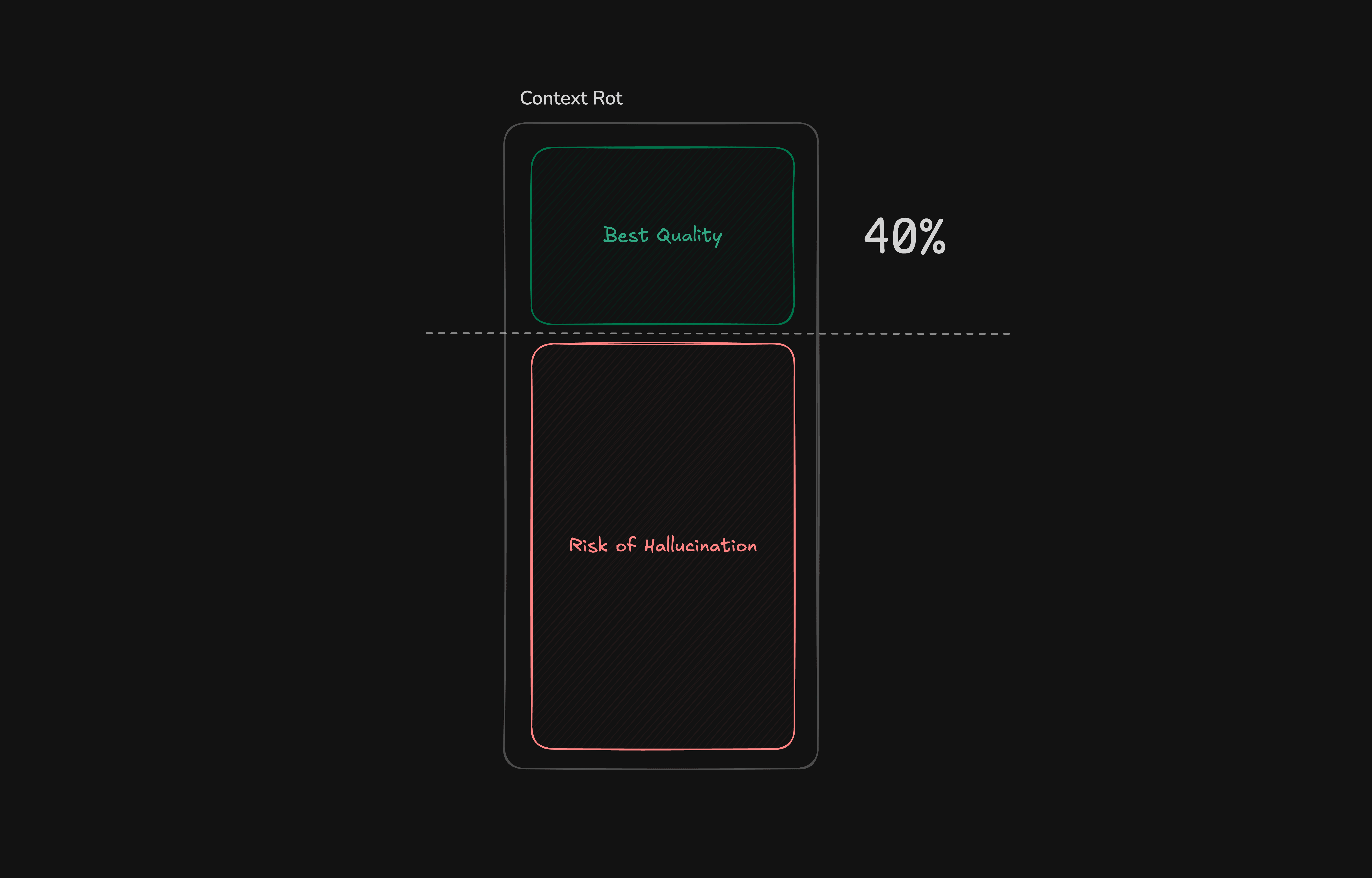
Three things keep the window hygienic.
First, progressive exposure. The model starts each turn seeing only skill descriptions and two meta tools: load_skill and search_tools. No functional tools, and no full skill instructions. When the model decides what it needs, it progressively fetches the full skill (which gets injected into the system prompt by prepareStep) and searches for the relevant tools (which get activated for the next step). The model only ever sees what it needs for the current path. Nothing else loads.
Second, subagents handle data fetching and reasoning so the main agent doesn't have to. When the main agent needs task data or energy data, it doesn't fetch raw database rows and reason about them in-context. That would pull it off its trajectory, burning steps on data interpretation instead of answering the user's question.
Instead, it calls dedicated subagents. Each subagent fetches the data, reasons through it in a focused context built for that one job, strips noise, and returns a compact summary:
Raw tool output:
[
  {
    "id": "task_001",
    "title": "Integrate Outlook calendar sync",
    "status": "in_progress",
    "priority": "high"
  },
  {
    "id": "task_002",
    "title": "Fix Apple App Store rejection feedback",
    "status": "todo",
    "priority": "urgent"
  },
  {
    "id": "task_003",
    "title": "Add LangFuse tracing to Nia agent loop",
    "status": "done",
    "priority": "medium"
  },
  {
    "id": "task_004",
    "title": "Write onboarding docs for contract devs",
    "status": "todo",
    "priority": "low"
  }
]
Cleaned summary passed back to the main agent:
task_001 — Integrate Outlook calendar sync (In Progress, High)
task_002 — Fix Apple App Store rejection feedback (To Do, Urgent)
task_003 — Add LangFuse tracing to Nia agent loop (Done, Medium)
task_004 — Write onboarding docs for contract devs (To Do, Low)
And if you're thinking "don't subagents add extra API calls?", consider that generateText already runs an internal step loop. Every step in that loop is effectively a sub-call to the LLM. Even without subagents, the main agent would spend steps making API calls to fetch and reason about data.
Now look at what the context looks like after these three changes:
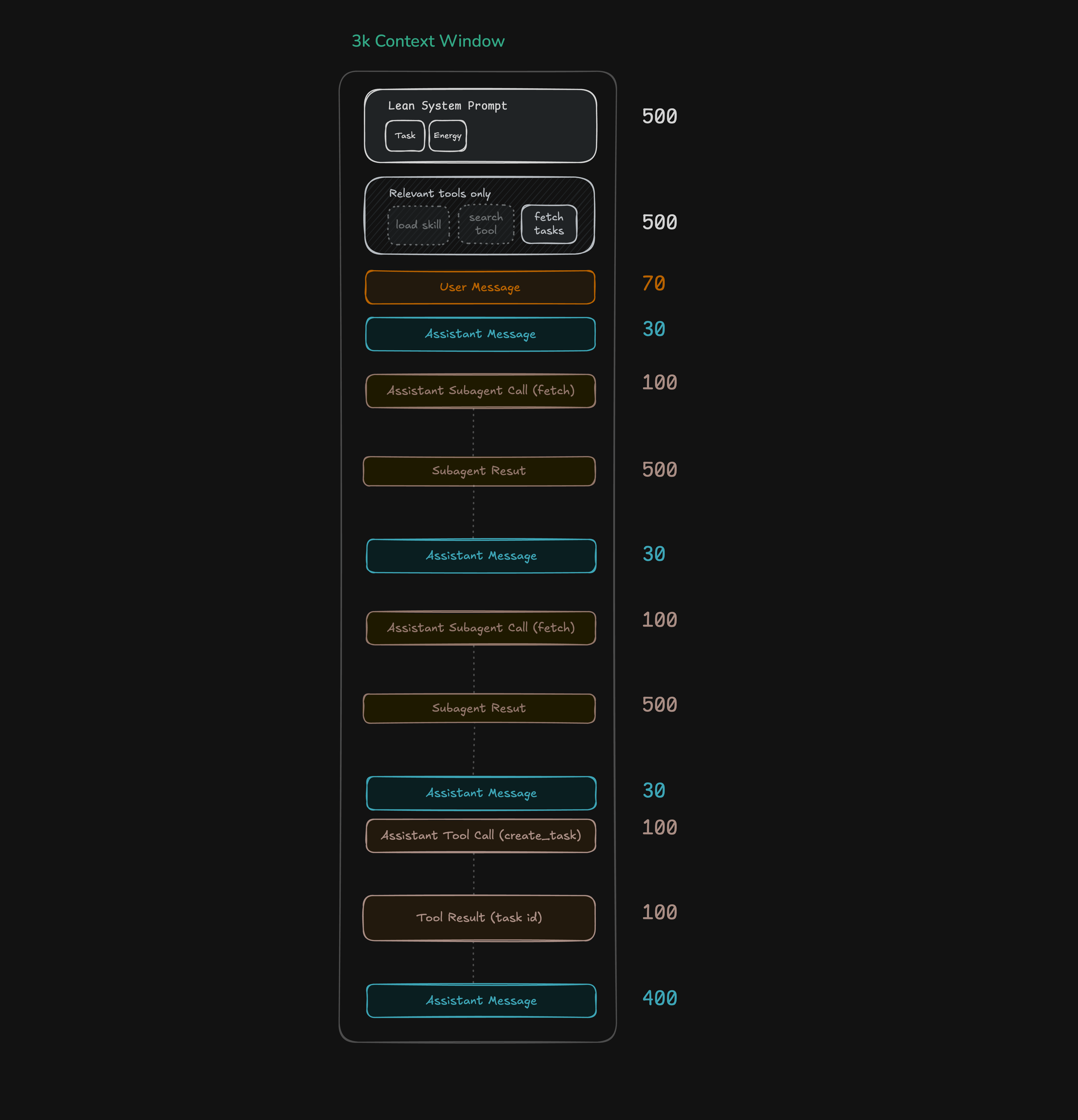
Compare that to the original 6.5k per step. The system prompt shrank from 1,000 to 500 (only the active skill). Tool definitions shrank from 2,000 to 500 (only relevant tools). Subagent results come back at 500 tokens instead of raw tool results at 900.
Here's the full before and after, side by side:
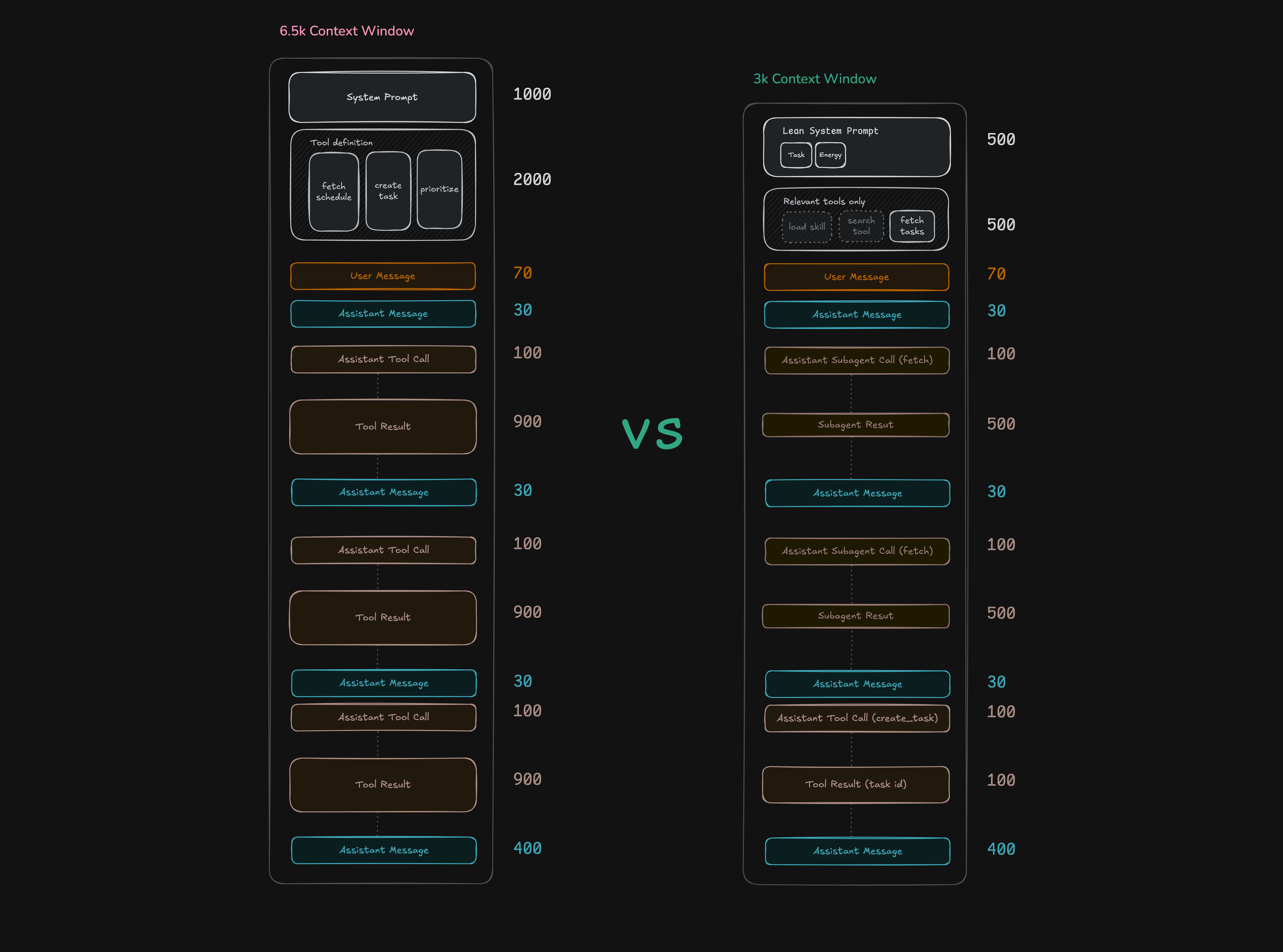
The measured impact:
| Scenario | Without optimisation | With optimisation | Savings |
|---|---|---|---|
| Per step (tool-using) | ~6,500 tokens | ~3,000 tokens | ~54% |
| Tool-using turn ("what's on my schedule?") | 8,500–10,500 tokens | 6,000–7,000 tokens | 18–33% |
| Simple follow-up ("thanks") | 1,800–2,300 tokens | ~1,000 tokens | 44–57% |
| Measured end-to-end (schedule flow) | 7,583 tokens | 5,969 tokens | 21.3% |
The naive design gets more expensive every step because old tool definitions and previous skill prompts ride along. This architecture only loads what the current path needs.
Third, compaction as a safety net. The first two changes keep the context hygienic but in long conversations, even hygienic history accumulates. When projected context tokens exceed 80% of the budget, a compaction call summarises the older history while keeping the last two turns. That summary is injected into the system prompt so the model retains awareness of older context without carrying the full message history.
It’s worth mentioning that compaction is not the solution for a dirty context window. If you skip the first two steps and try to use compaction to clean up noisy, bloated context, your summary will be noisy and bloated too. The compaction agent can only work with what you give it. If what you give it is stale tool results sitting next to old skill instructions and raw database dumps, it will produce a messy summary, and that mess will ride along in your system prompt for every turn after.
3. Define "good" before users arrive.
Most founders only think about output quality when users complain. By then you're debugging in production with real money on the line. Evals let you define "good" in code before a single user sees the product.
This is what an LLM-as-judge eval looks like:
it('produces an energy-aware prioritisation under poor sleep', async () => {
  await seedScenario('poor_sleep', 'deadline_pressure');
  const result = await runTracedConversation(
    ['what should I work on next?'],
    makeChatConfig({ currentHour: 11 }),
  );
  const judged = await judgeOutput({
    scenario: 'Tasks=deadline_pressure, energy=poor_sleep, hour=11',
    rubric:
      'Does the response account for low energy, deadline urgency, and recommend when to do work?',
    output: result.outputs[0],
  });
  expect(judged.score).toBeGreaterThanOrEqual(3);
});
You set up a scenario, let the agent run through it, then have another AI grade how well it did based on criteria you give it. If the score hits your threshold, you're good.
One more. This trajectory eval tests whether the agent can change direction mid-conversation and come back:
it('can change trajectory and return to the earlier task safely', async () => {
  await seedScenario();
  const result = await runTracedConversation(
    [
      'show me my tasks',
      "actually, how's my energy right now?",
      'okay, mark the first one done',
    ],
    makeChatConfig(),
  );
  const energyTurnTools = toolNamesForTurn(latestTraceForTurn(result.traces, 1));
  expect(energyTurnTools).toContain('load_skill');
  expect(result.outputs[1].toLowerCase()).toMatch(/energy|peak|dip|rebound/);
  const finalTurnTools = toolNamesForTurn(latestTraceForTurn(result.traces, 2));
  expect(finalTurnTools).toContain('resolve_task');
  expect(finalTurnTools).toContain('update_task');
});
Three turns, a quick change of direction in the middle, and the agent still gets back on track to finish the right task at the end. If you switch to a different model and this test fails, you'll know right away.
The founder's sequence:
- Start with the smart model. Build the product.
- Write evals that define what "good" looks like.
- When you want to experiment with a different model, your evals tell you instantly whether it holds up.
Start here
The full code is here.
I wasted three months learning what I could have learned in a weekend. Get the smartest model you can afford, keep its context hygienic, write evals before users arrive, and get out of the way.